Multisearch: Customizable Google search fields on your New Tab screen
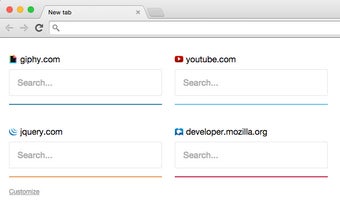
Multisearch is a Chrome add-on developed by sawyerh that replaces the New Tab screen with site-specific Google search fields. This handy tool allows you to customize your New Tab screen by adding search fields for different websites, making it easier and more efficient to search for specific content.
With Multisearch, you can personalize your browsing experience by adding search fields for your favorite websites directly on the New Tab screen. Whether you frequently search for articles on news websites, products on e-commerce platforms, or videos on streaming sites, Multisearch enables you to have quick access to site-specific search fields without having to navigate through multiple tabs or bookmarks.
The ability to customize the search fields according to your preferences is what sets Multisearch apart. You can easily add or remove search fields, arrange them in any order, and even assign keyboard shortcuts for quick access. This level of customization ensures that you have a tailored browsing experience that aligns with your specific needs.
Multisearch is a free add-on available in the Browsers category under Add-ons & Tools. If you want to streamline your browsing experience and have quick access to site-specific Google search fields on your New Tab screen, Multisearch is definitely worth a try.